Secure Data Handling
Lost data is like lost time: you can never fully take it back!
Secure research data handling means a set of procedures and technical measures that protect data throughout the entire project life cycle – from its collection and processing to archiving or sharing. This includes appropriate selection of storage locations, regular backups, control of access rights, protection of personal and sensitive data, encryption of transmissions and devices, and the use of secure working practices within the team. The aim is to ensure the integrity, credibility and security of the entire research process, minimizing the risks of loss, damage, unauthorized access or leakage of data.
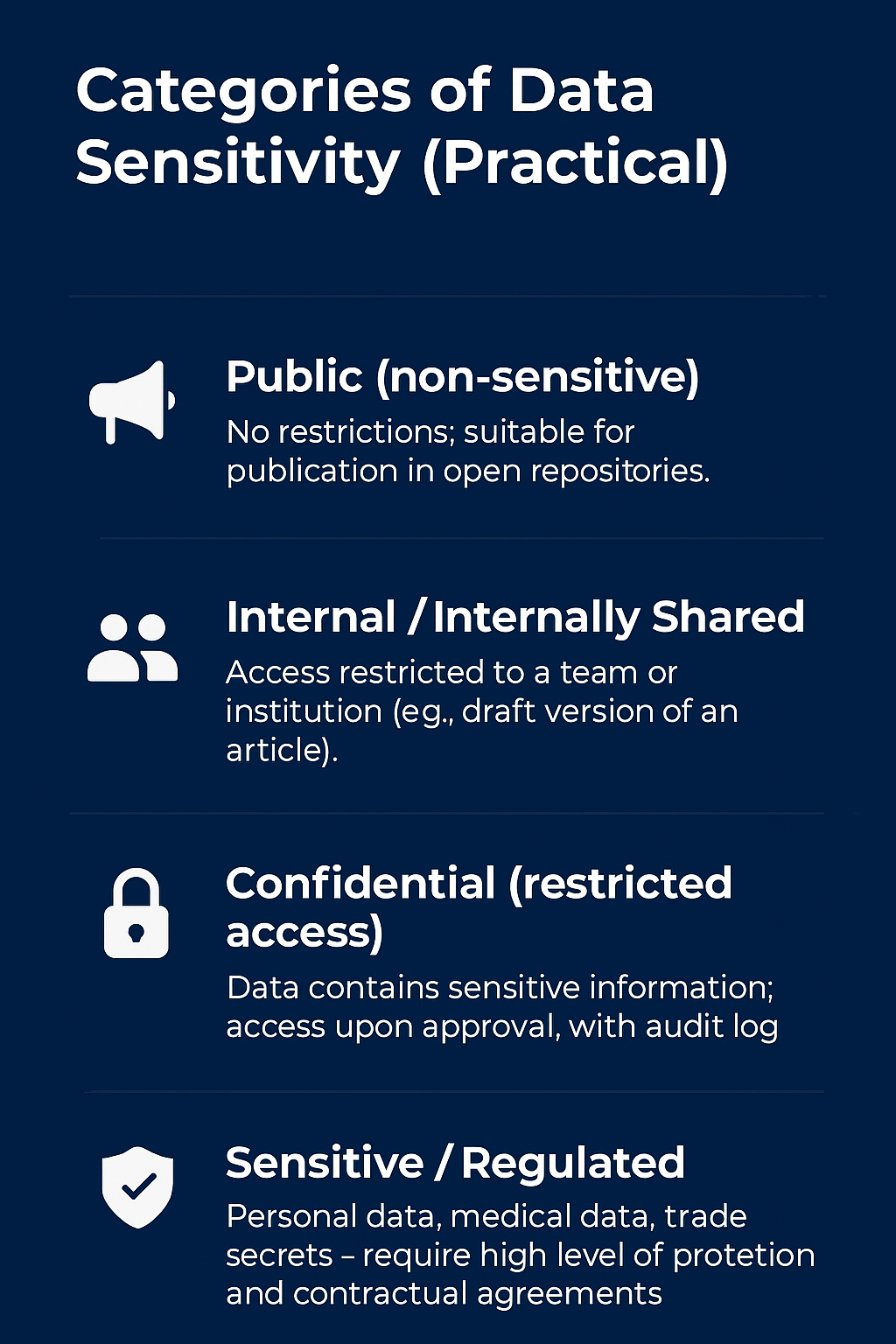
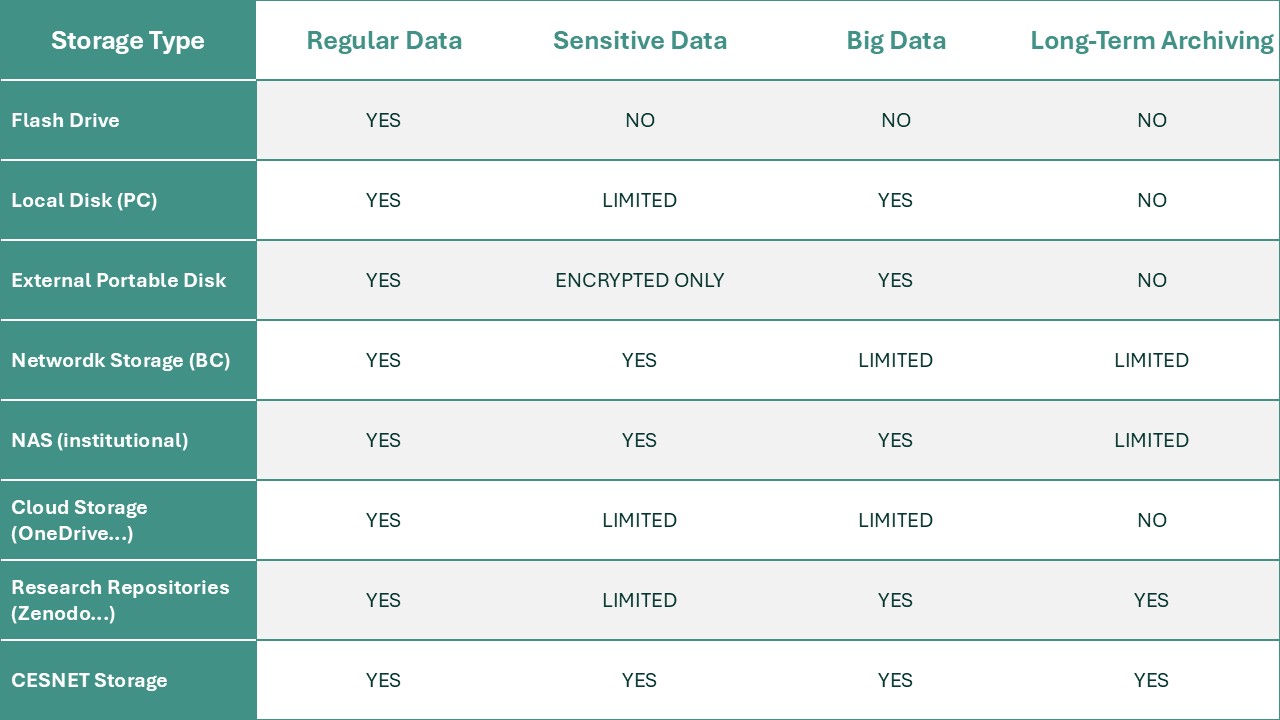
For scientists and research organizations, data management is essential not only from a legislative perspective (e.g. GDPR, ethical standards, contractual obligations), but also for maintaining the reputation and credibility of research. Errors in storing or sharing data can lead to the irreversible loss of unique results, violation of the rights of research participants or questioning of published conclusions. When planning research, it is therefore necessary to think about structuring data, labeling it, controlling access within the team, suitable formats for archiving and also how to handle the data after the project ends. In practice, it is therefore important to think about choosing a suitable storage location based on the sensitivity of the data.
Flash drives
Characteristics: mall, portable, inexpensive
Advantages: portable; instant access without a network
Disadvantages/risks: easily lost or damaged; prone to data loss; security (often unencrypted)
Recommendations: only used for short-term transfers or "working copy" backups. Never as the sole repository for main data; encrypt; have at least one copy.
Portable drives (external HDD/SSD)
Characteristics: higher capacities than flash drives, suitable for backups
Advantages: portable, price/volume of data
Disadvantages: risk of physical damage; security
Recommendations: use for off-site backups, keep one copy in another location; regularly test data integrity.
Network Attached Storage (NAS)
Characteristics: dedicated device providing network storage (typically with RAID, user accounts)
Advantages: flexible, possibility of redundant array (RAID), suitable for sharing in a team
Disadvantages: administrator has to deal with updates, security; RAID is not a backup (user errors are propagated)
Recommendations: combine NAS (first level) with off-site or cloud-backup. For internal large volumes of data, this is often ideal.

Data repositories / data repositories (Zenodo, Dryard, ASEP, etc.)
Characteristics: designed for research data, supports persistent identifiers and metadata
Advantages: allows for DOI assignment, meets FAIR and grant requirements; often provides long-term retention
Disadvantages: may have storage size limits or format requirements; not always suitable for highly sensitive data without access restrictions
Recommendations: Publish final data intended for sharing; for sensitive data, use repositories with access control or store only anonymized datasets + open metadata.

Local disk
(in a computer)
Characteristics: basic storage for work
Advantages: fast access, suitable for data analysis
Disadvantages: risk of hardware failure, theft, loss; often lacks automatic backup
Recommendations: do not keep a single copy there; regular backup to another physical medium or network storage; encryption for sensitive data.

Network storage (institutional network drives, fileshares)
Characteristics: central server in the institution accessible via LAN/VPN
Advantages: central management, IT-managed backups, access rights options
Disadvantages: dependence on institutional infrastructure and management; capacity limits; off-campus availability may require VPN
Recommendations: suitable for internal data and drafts; verify SLA (availability), backup policy, and retention.

Cloud storage
(Google Drive, OneDrive, etc.)
Characteristics: scalable, accessible via the Internet
Advantages: good availability, automatic backups, integration with tools, easy sharing
Disadvantages: legal issues (where the data is physically located), costs for large volumes, dependence on the supplier
Recommendations: for public or internal data, the cloud is suitable; for sensitive data, check the terms of service, encryption (at-rest and in-transit) and data location (GDPR). For long-term archiving, other services are better.
National/scientific services (e.g. CESNET)
Characteristics: services intended for the scientific community (CESNET: VO Storage, ownCloud, FileSenderThey offer capacity tailored to scientific needs.
Advantages: available to BCs without additional fees; trustworthy in terms of long-term preservation and compliance
Disadvantages: access limited to users of connected institutions
Recommendations: for large volumes of scientific data and sharing within research teams, CESNET (or similar national services) in the Czech Republic is a very suitable choice; check the terms of service and limits.
3-2-1 Backup: The Golden Rule for Protecting Your Data
At the BC, data represent the most important outcome of years of research, laboratory experiments, and field data collection. Losing this data is not merely a technical issue; it jeopardizes entire projects, grant commitments, and publication efforts. The 3-2-1 strategy is an internationally recognized standard for ensuring maximum redundancy and resilience for your datasets.
Data from biological experiments are often irreproducible or take a very long time to collect (seasonal collections, unique genetic sequences). The 3-2-1 rule forms the cornerstone of the Data Management Plan, which is now standard practice for most grant providers.
3 copies
Minimum redundancy
Always keep at least three copies of your research data. The first is the original, primary, raw data you’re working with. You keep this on your computer or lab instrument. The other two are independent backups. Statistically, this eliminates the risk of simultaneous write errors or media failures. If all three copies fail, you might go home. The world has probably come to an end…
2 media
Storage diversification
The two backups mentioned in the first point must not be stored on the same type of technology—let alone on the same device! Combine different storage technologies and devices. Store one copy on an external SSD or HDD, for example, and the other on network storage. This prevents data loss caused by a hardware failure or a specific system error affecting one type of storage medium.
1 outside
Geographic separation
At least one copy must be stored at a different location than the rest of the copies. In the context of business continuity, this means using a remote cloud (e.g., CESNET) or at least a separate server node in a different building. Geographic separation is the only effective protection against natural disasters and other unforeseen events (fire, water main breaks) or cyberattacks.
Recommendations for selecting storage solutions
If you need help setting up research data backup, don't hesitate to contact your institute's IT support. The guys have got it covered. If you need advice on the Data Management Plan, grant terms related to data storage and sharing, or uploading data to a repository, write to your institutional data steward.